Dropbox alternative
Your files are stored. Is the paperwork getting done?
File storage keeps documents safe. Ademero gets them read, named, approved and signed. Keep Dropbox as the place files land, or run the whole process in Nucleus One.
CapturePoint 6 exports straight into Dropbox. Nucleus One runs on Google Cloud.
Keep Dropbox
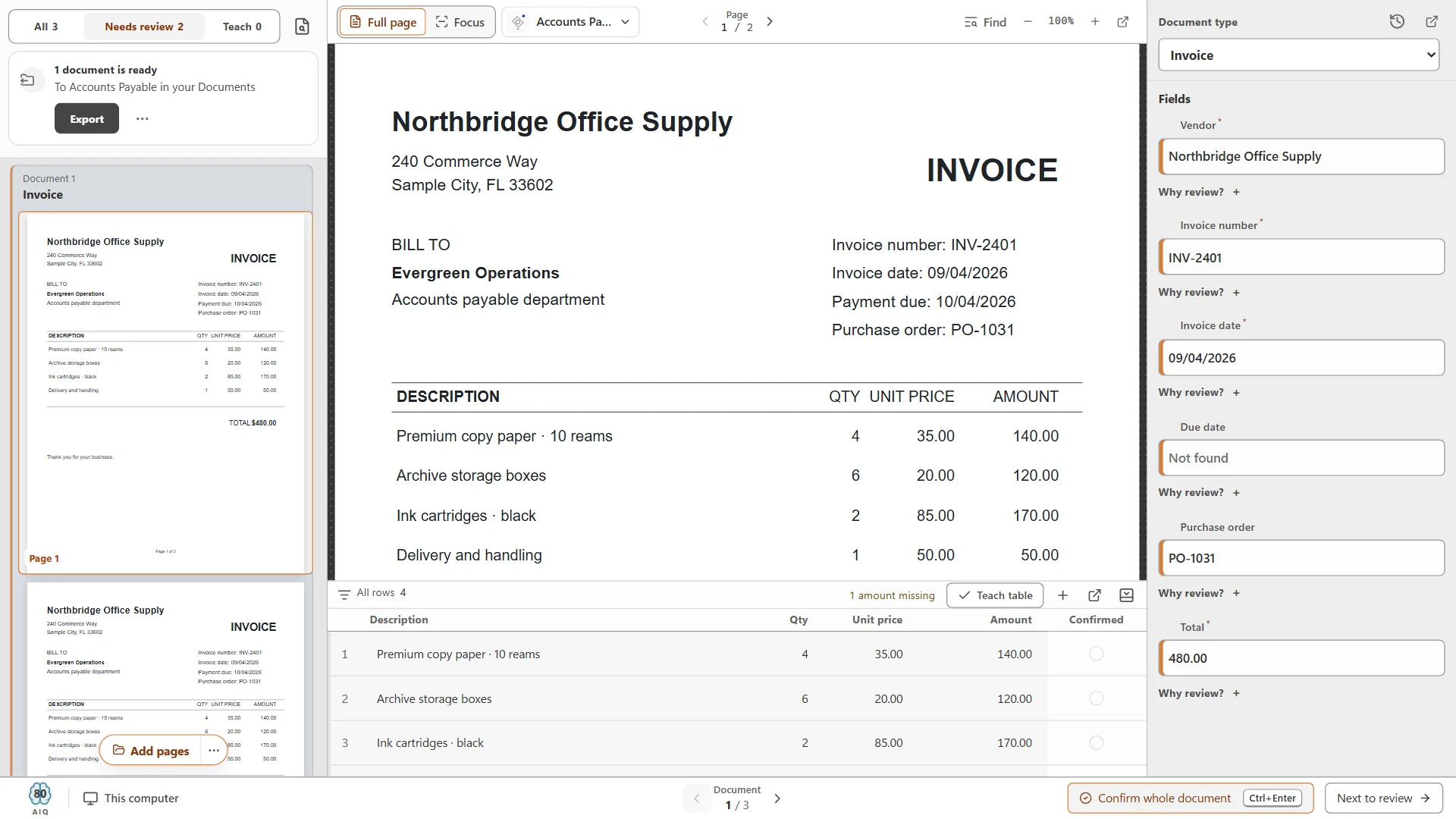
Scan it, and it lands in Dropbox already named.
- Named and filed for you, no typing
- Searchable PDFs with the data read
- Also sends to Box, SharePoint, OneDrive and Google Drive
What to check
When storage is not enough.
Teams usually outgrow file storage at the same few points. Here is what Ademero adds at each one.
- Approvals
- Workflows route each document for review and approval, and everyone sees where it stands.
- Signatures
- E-signatures built into Nucleus One and Content Central, on the document itself.
- Finding things
- Full-text search reads inside every document, not just file names, plus fields you define.
- Collecting from clients
- Client portals and forms in Nucleus One gather documents and answers in one place.
- Keeping records right
- Every version kept, permissions on every document, retention rules and a full audit trail.
- Getting data out
- Paige reads documents and returns clean fields and line items by download, SFTP or webhook.
Clean data
Every invoice field, without the typing.
- Splits, sorts and reads documents
- Fields and full line-item tables
- Delivered by download, SFTP or webhook
Sends it where you work
Your documents land right where your team already looks.
Every finished document goes out as a searchable PDF with its data, named and filed. Send it to your own folders, Content Central or Nucleus One, or straight into SharePoint, OneDrive, Google Drive, Dropbox and Box.
 SharePoint
 OneDrive
 Google Drive
 Dropbox
 Box
Box

- Your own folders
And many more systems through Cortexa Connect. Tell us where your documents need to go.
Your options
Three ways to go past storage.
Keep Dropbox
Add CapturePoint 6
AI capture on your own PC that files named, searchable PDFs into Dropbox.
About CapturePoint 6Move the process
Nucleus One
Documents, workflows, tasks, forms, e-signatures and client portals on Google Cloud.
About Nucleus OneGet the data
Paige
Send in documents, get clean data back. Nothing to install.
About Paige
Simple to buy
Each product is sold the way you use it.
Tell us about your setup and we will send pricing that fits.
- CapturePoint 6Priced per scanning station, with unlimited scanning.
- Nucleus OnePriced per user, with every feature on every plan.
- PaigeSold as monthly plans sized to your document volume.
- Content Central and CortexaContent Central is quoted for your users and setup. Cortexa is quoted for your servers and workload.
Switching
Moving over, step by step.
- 01
Look at the work
We look at what your team does with documents today, not just where they are stored.
- 02
Pick the fit
Keep Dropbox and add capture, move to Nucleus One, or both.
- 03
Move
Folders and documents moved over, with workflows and permissions set up for you.
- 04
Go
Your team trained and working, with iOS and Android apps for Nucleus One.
Trusted by 1,000+ organizations since 2002.
Fortune 500 companies and government agencies run on Ademero. Their security, IT and legal teams review us every year and keep renewing.
- Organizations
- 1,000+
- Building document software since
- 2002
- And government agencies
- Fortune 500
- We sign them
- HIPAA BAAs
Questions buyers ask.
Do we have to stop using Dropbox?
No. CapturePoint 6 and Paige send finished documents straight into Dropbox. Move to Nucleus One only when you want workflows, e-signatures and client portals in the same place.
What does Nucleus One cost?
Nucleus One is priced per user, with every feature on every plan. Tell us about your setup on the pricing page and we will send pricing that fits, or book a free live demo and we will walk you through it.
Does it work on phones?
Yes. Nucleus One has iOS and Android apps as well as the web app.
Can it connect to our other apps?
Nucleus One connects through Zapier and a REST API. CapturePoint 6 and Paige also export to SharePoint, OneDrive, Google Drive and Box.
Free live demo
See your paperwork run itself, not just sit in a folder.
Book a free demo and we will show you around, answer your questions and run your real paperwork through it. No cost, no pressure.
- A live tour of the products that fit your work
- Your own documents, set up and shown working
- Your workflow and process, mapped with you
- Straight answers from people who build it
