Hospitality
Ademero for hospitality
Folios, invoices, HR files and contracts across every property.
CapturePoint 6 for hospitality
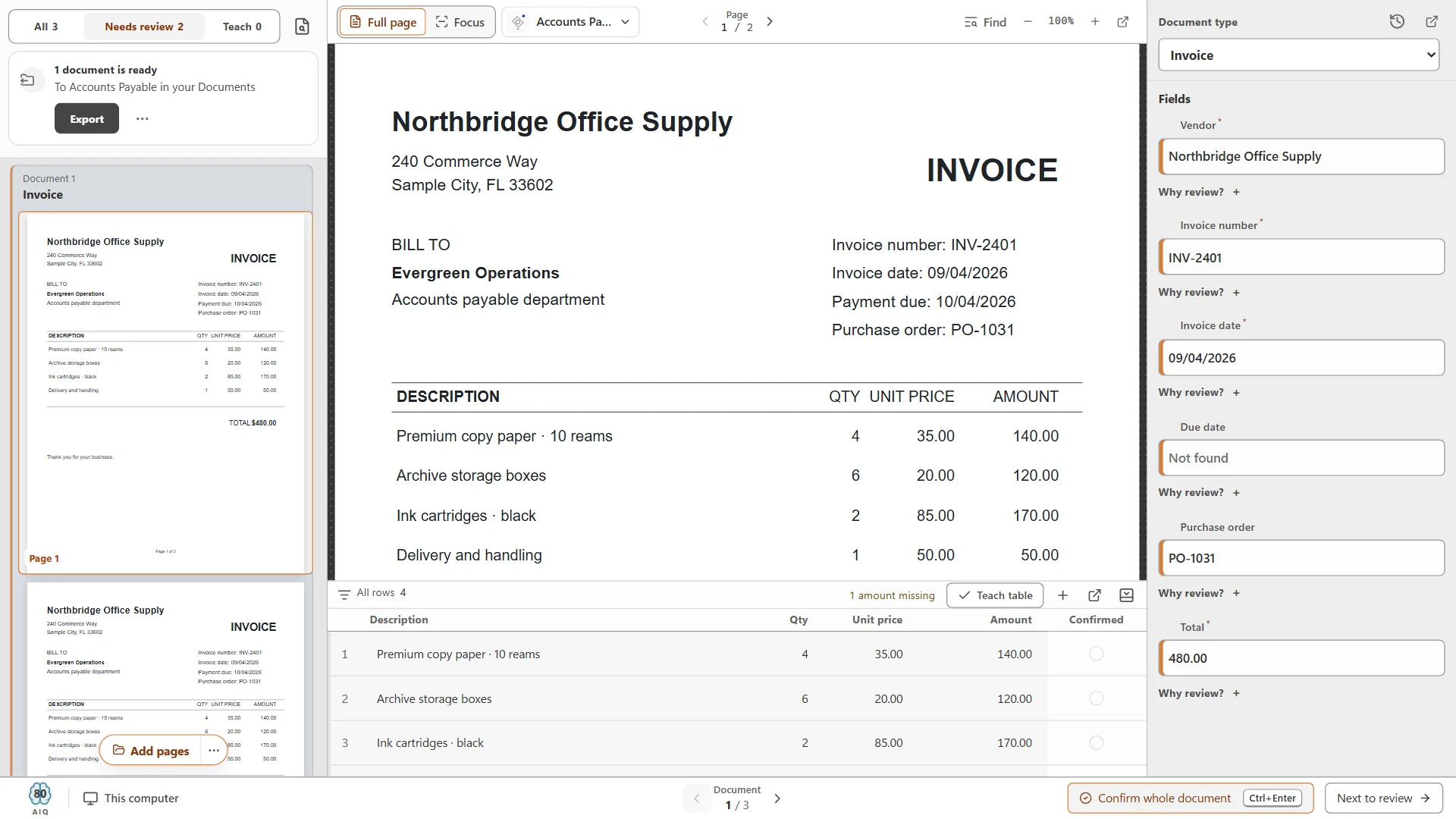
CapturePoint 6 reads every vendor invoice, folio and new-hire packet, pulls out the names, numbers and dates, and files each one by property. The AI runs on your own PC.
Free trial starts the first time you open it. No form.
The problem
Back-office staff at a busy property spend hours a week sorting, naming and filing paper that a scanner could handle.
Invoices, folios, timesheets and forms come in mixed together and get separated one page at a time.
Vendor names, invoice numbers and totals get keyed into accounting from paper, one line at a time.
A scan named with today’s date helps no one when a vendor or guest calls about it in six months.
CapturePoint 6
Confirm what CapturePoint 6 read on one document and it applies that to the rest of the stack. Invoices come out with vendor, number, dates and line items; folios and HR forms come out split, sorted and named.
Sends it where you work
Every finished document goes out as a searchable PDF with its data, named and filed. Send it to your own folders, Content Central or Nucleus One, or straight into SharePoint, OneDrive, Google Drive, Dropbox and Box.
 SharePoint
 OneDrive
 Google Drive
 Dropbox
 Box
Box

And many more systems through Cortexa Connect. Tell us where your documents need to go.
Content Central
Send finished documents to Content Central and they land in folders by vendor and property, searchable by any word on the page and ready for approval workflows.
Hospitality
CapturePoint 6
Accounts payable
Anything that comes across a back-office desk: vendor invoices, guest folios, receipts, timesheets, applications and onboarding forms, contracts and inspection paperwork. It comes with sample jobs for invoices and HR, and learns your own documents from a few examples.
CapturePoint 6 runs on a Windows PC and works with TWAIN scanners. It also takes PDF, TIFF, JPEG and PNG files, so documents from a phone or a copier can be read too.
Wherever you choose: a network folder with automatic folder and file naming, Content Central, Nucleus One, SharePoint, OneDrive, Google Drive, Dropbox or Box. Each document can arrive as a searchable PDF with its data alongside.
The free trial starts the first time you open it, with no form to fill in. CapturePoint 6 is priced per scanning station, with unlimited scanning. Tell us about your setup on the pricing page and we will send pricing that fits, or book a free live demo and we will walk you through it.
Fortune 500 companies and government agencies run on Ademero. Their security, IT and legal teams review us every year and keep renewing.
Free live demo
Book a free demo and we will show you around, answer your questions and run your real paperwork through it. No cost, no pressure.
