AI glossary
AI terms, in plain English.
Every AI pitch comes with its own vocabulary. Here is what the words actually mean, and where each one shows up when software reads your documents.
32 terms
- APIRunning AI
- A way for one piece of software to call another. AI services are usually used by other apps through an API.
- Cortexa has an OpenAI-compatible API; Content Central and Nucleus One have REST APIs. Learn more
- Artificial intelligenceAIBasics
- Software that does work we used to think needed a person: reading, recognizing, sorting, answering questions and making routine decisions.
- Confidence scoreReading documents
- How sure a model is about an answer. Low-confidence answers are the ones worth a person checking.
- Data extractionReading documents
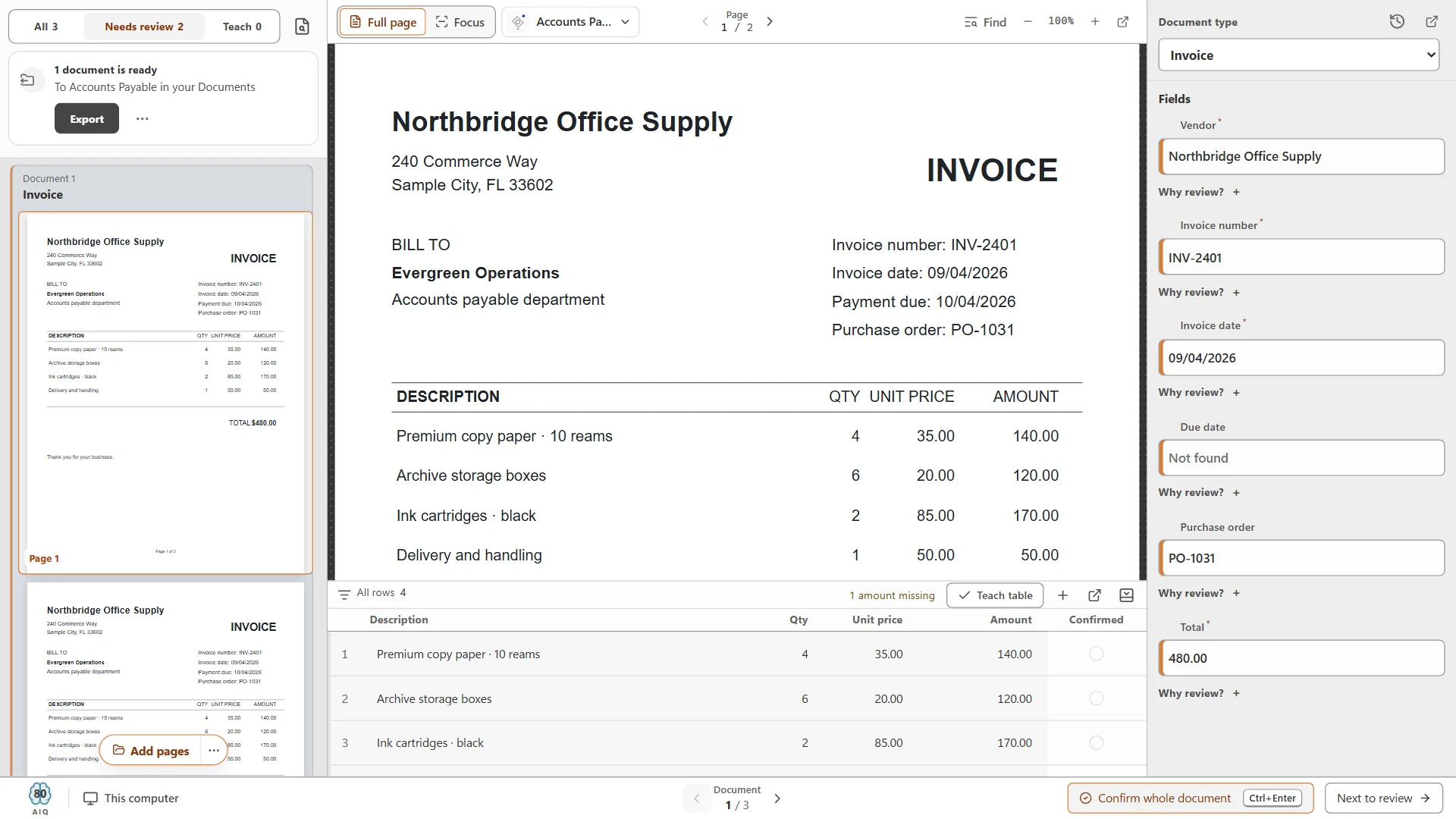
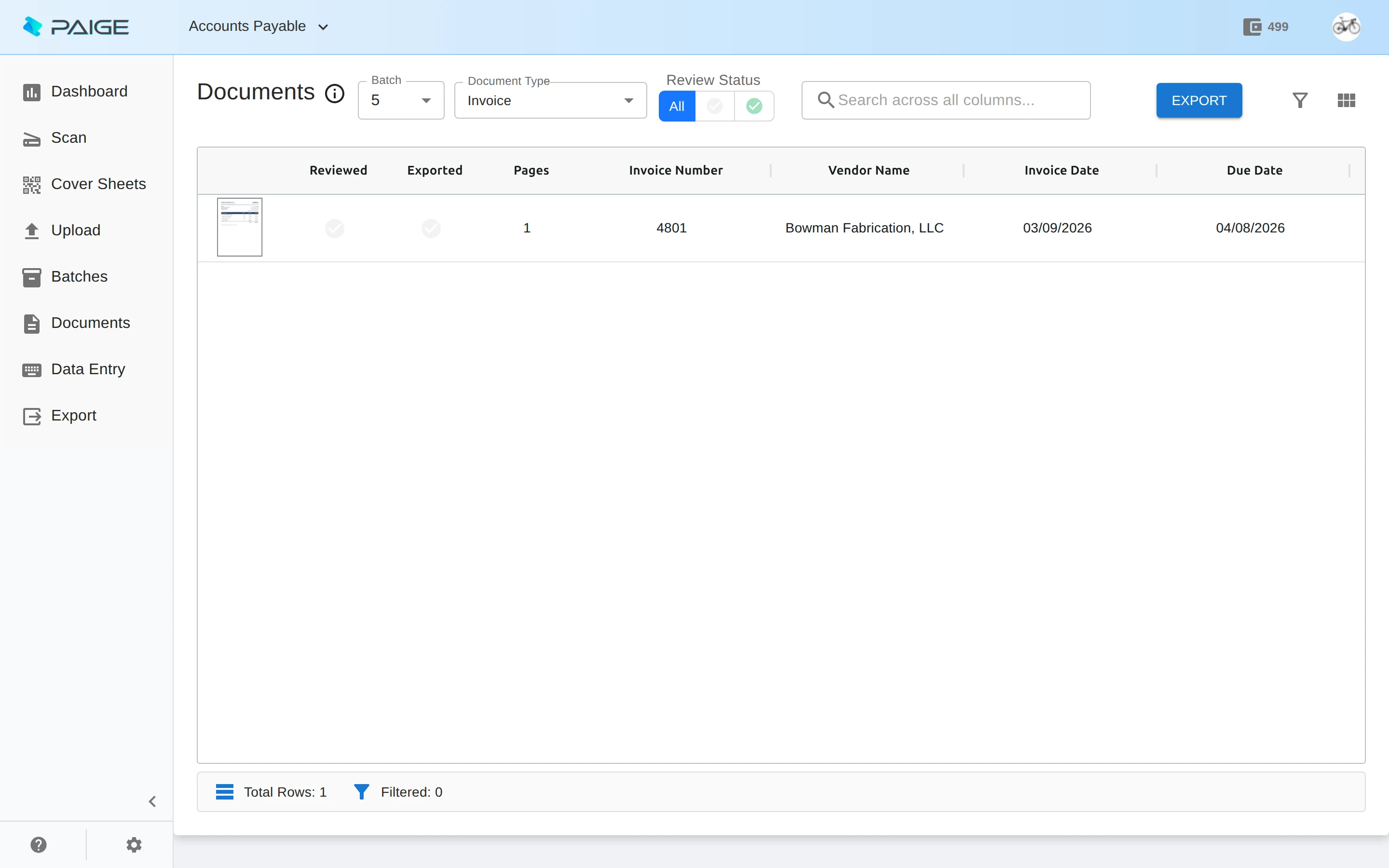
- Pulling specific values out of a document, such as a vendor name, an invoice number, a date or a total.
- Paige pulls fields and line items and sends back clean data. Learn more
- Document classificationReading documents
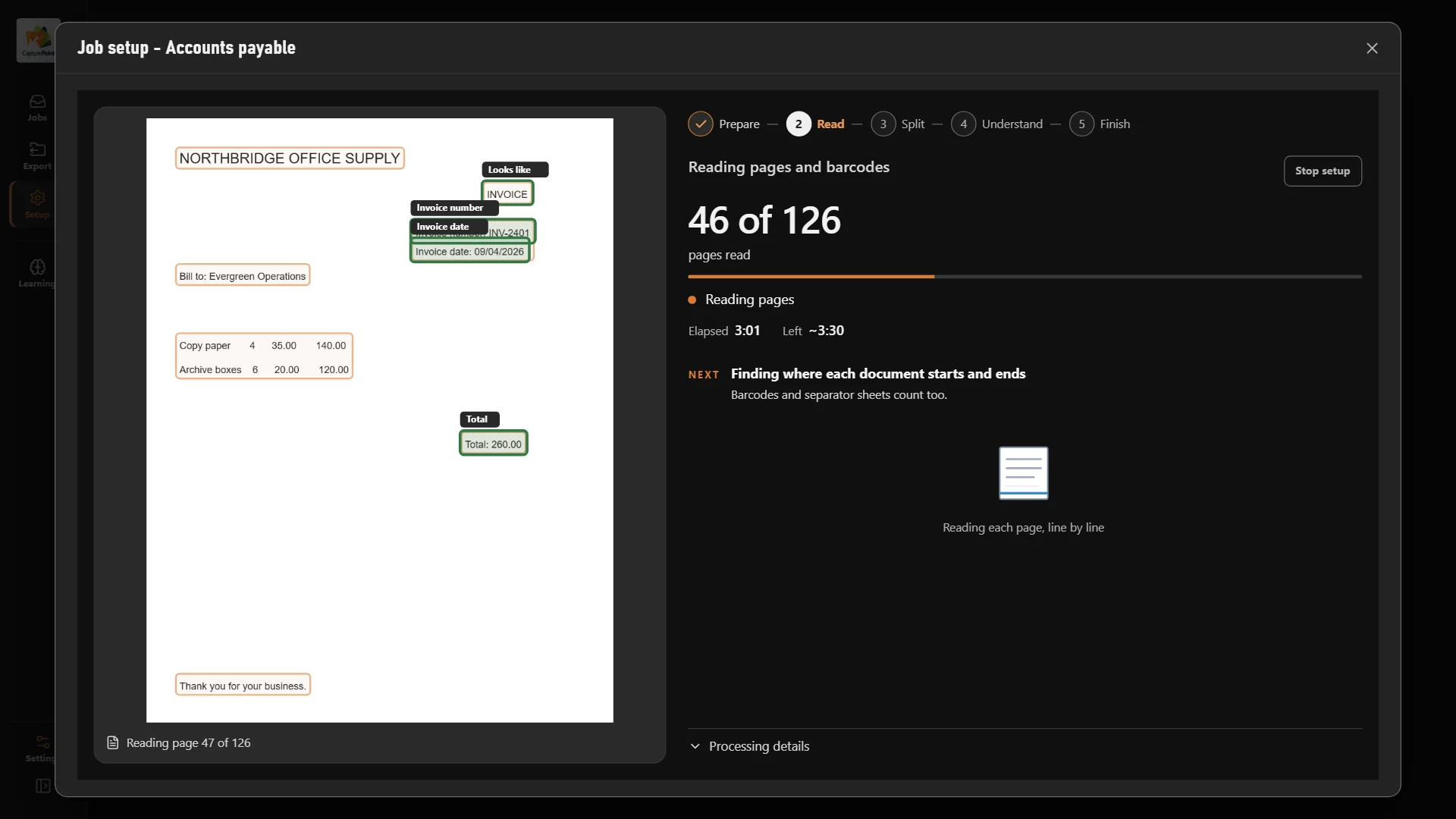
- Working out what kind of document a page is, such as an invoice, a statement or a claim, so it can be handled the right way.
- CapturePoint 6 finds every document type in a folder by itself. Learn more
- Document separationReading documents
- Finding where one document ends and the next begins in a stack scanned all at once.
- CapturePoint 6 and Paige split stacks into their documents. Learn more
- EmbeddingLanguage AI
- A list of numbers that captures what a piece of text means, so software can find related text even when the words differ.
- Cortexa offers embeddings through its OpenAI-compatible API. Learn more
- GPURunning AI
- A graphics processor. Its ability to do many small calculations at once makes AI run much faster.
- For CapturePoint 6 a graphics card is optional. Learn more
- HallucinationLanguage AI
- When a language model states something that sounds right but is not. Grounding answers in your own documents and checking them reduces it.
- Human in the loopAutomation
- Designing automation so a person checks the cases the AI is unsure about, and the AI learns from what they confirm.
- CapturePoint 6 learns from every answer you confirm. Learn more
- InferenceBasics
- Using a trained model to get an answer on something new, like reading a document it has never seen.
- Intelligent document processingIDPReading documents
- Going past OCR to understand a document: what kind it is, which values matter, and where it should go next.
- CapturePoint 6 and Paige split, sort, read and deliver documents. Learn more
- Key-value pairReading documents
- A label and its value on a page, such as "Invoice date" and the date next to it. Extraction is mostly about finding these reliably.
- Large language modelLLMLanguage AI
- A very large model trained on text that can write, summarize, answer questions and follow instructions. Chat assistants are built on them.
- Cortexa runs language models on servers you own. Learn more
- Line-item extractionReading documents
- Reading every row of a table on a document, like each product, quantity and price on an invoice, not just the totals.
- CapturePoint 6 and Paige read full line-item tables. Learn more
- Local AIRunning AI
- AI that runs on your own computer instead of a remote data center, so the documents it reads never leave the machine.
- CapturePoint 6 does all of its AI work on your Windows PC. Learn more
- Machine learningMLBasics
- The part of AI where software learns from examples instead of following hand-written rules. Show it enough invoices and it learns what an invoice looks like.
- ModelBasics
- The trained result of machine learning: the piece of software that takes an input, such as a page, and produces an answer, such as the document type.
- Natural language processingNLPLanguage AI
- AI that works with human language: reading it, sorting it, summarizing it and answering questions about it.
- Neural networkBasics
- A kind of model built from many small connected layers. Most modern AI, including the models that read documents and write text, is built this way.
- Optical character recognitionOCRReading documents
- Turning the picture of a page into text a computer can search and copy. OCR alone tells you what the words are, not what they mean.
- CapturePoint 6 saves every scanned document as a searchable PDF. Learn more
- Private AIRunning AI
- AI that runs on infrastructure you control, so prompts, documents and answers are never sent to a public AI service.
- Cortexa runs private AI on servers you own. Learn more
- PromptLanguage AI
- The instruction or question you give a language model. Clear prompts with good examples get better answers.
- Retrieval-augmented generationRAGLanguage AI
- Having a language model look up your own documents first and answer from them, instead of answering from memory.
- Robotic process automationRPAAutomation
- Software that repeats the clicks and keystrokes a person would make in other applications. It handles structured screens well and documents poorly without IDP in front.
- Semantic searchLanguage AI
- Search by meaning rather than exact words, so a search for "payment terms" also finds "net 30".
- Straight-through processingSTPAutomation
- A document that goes from arrival to finished without anyone touching it. The more of these, the more time AI saves.
- Template-based captureReading documents
- The older approach of drawing zones on a sample form so software knows where each value sits. It breaks when a layout changes.
- CapturePoint 6 works without templates or zones. Learn more
- Training dataBasics
- The examples a model learns from. For document AI, that means sample documents and the right answers for them.
- ValidationReading documents
- Checking extracted data against rules, such as whether the line items add up to the total, before it goes anywhere.
- CapturePoint 6 catches totals that do not add up. Learn more
- WebhookRunning AI
- A message one system sends another the moment something happens, such as "this document is done, here is the data".
- Paige delivers results by webhook, SFTP or download. Learn more
- Workflow automationAutomation
- Routing work through the right steps and people automatically, such as sending an invoice for approval once it is read.
- Content Central and Nucleus One run approvals and routing. Learn more
The products
See the terms at work.
Same AI, three places to run it. Pick the one that fits where your documents have to stay.
CapturePoint 6 · On your own PC
Document AI that runs next to your scanner.
Splits, sorts, reads and names every document right on your Windows PC. No data center, no per-page AI bill, and nothing sent out to be read.
Paige · In the cloud
Send in documents. Get clean data back.
Learns your documents from a few samples, then pulls fields and line items and delivers them by download, SFTP or webhook.
Cortexa · On your own servers
Private AI inside your own walls.
The AI inside CapturePoint 6 and Paige, on servers you own, with an OpenAI-compatible API your tools already speak.
Free live demo
Ask us anything about AI and your documents.
Book a free demo and we will show you around, answer your questions and run your real paperwork through it. No cost, no pressure.
- A live tour of the products that fit your work
- Your own documents, set up and shown working
- Your workflow and process, mapped with you
- Straight answers from people who build it
