Approval workflows

Approvals that move without being chased.

Each document goes to the right approver at the right step, waits in their queue, gets signed electronically and moves on. Every decision is on the record.
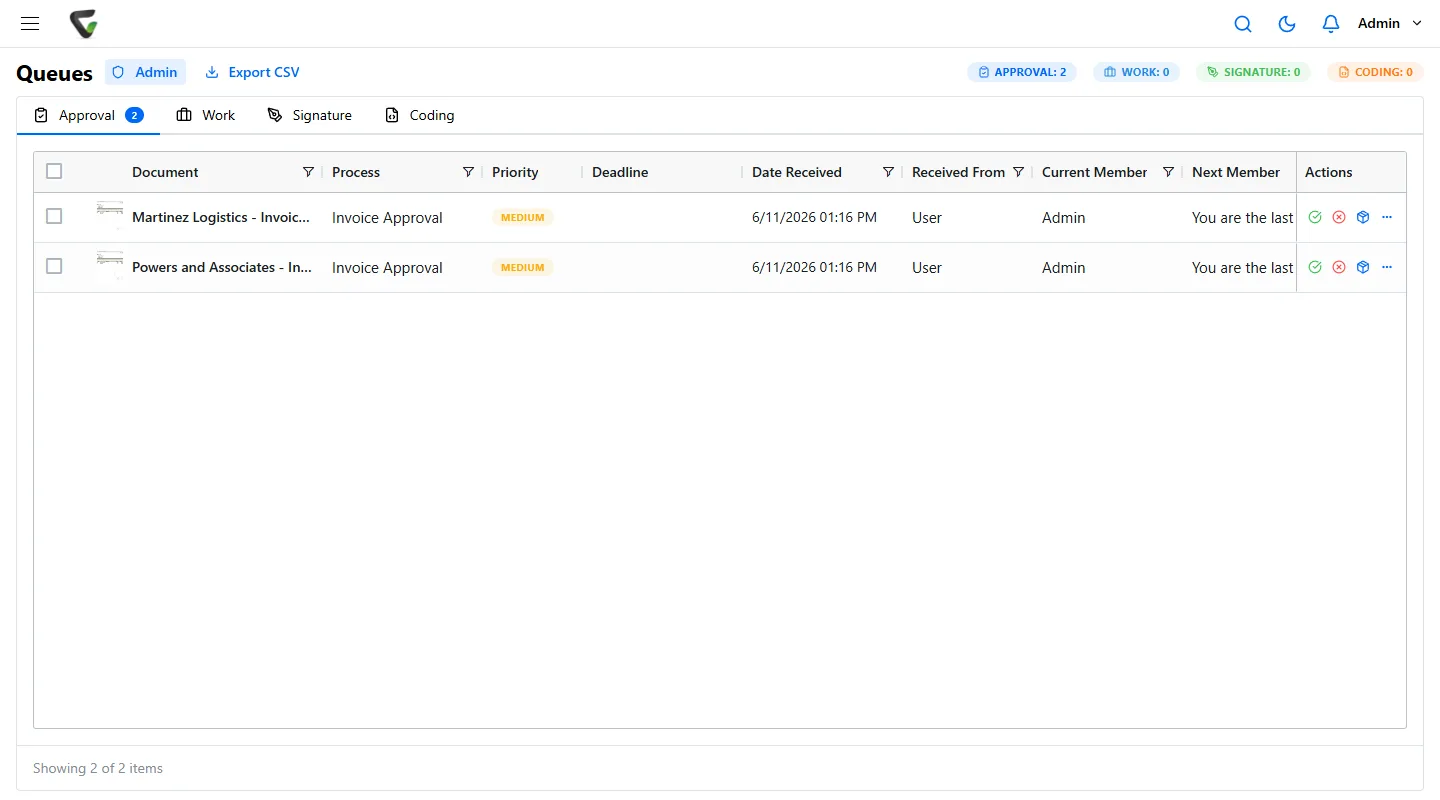
Content Central approval queue with two invoices waiting for approval

The problem

Approvals die in inboxes.

The work is done. It just needs a signature from someone who has not opened the email yet.

  • Where is it?

    Nobody can tell whether a document is waiting on finance, legal or the person on vacation.

  • Who said yes?

    Approvals given in a hallway or a reply-all leave nothing an auditor can check.

  • Every request is different

    Each department routes its own way, and new staff learn the rules by getting them wrong.

CapturePoint 6

Paper starts the workflow the moment it is scanned.

CapturePoint 6 splits, sorts, reads and names each document with cutting-edge AI on your own PC, so a scanned invoice or form arrives ready to route.

  • Document AI that runs on your own PC
  • Named by type, so the right workflow starts
  • Unlimited scanning, no per-page fees

Content Central

Build the route once. No developers.

Set the trigger, the steps and who approves at each one. Content Central runs it the same way every time and records every decision with the person and the time.

  • Triggers, rules and actions
  • E-signatures at any step
  • A full audit trail on every decision

Nucleus One

Approvals in the cloud, free to start.

Nucleus One sends documents for approval and signature in the cloud, with tasks, forms and the mobile apps so approvers can say yes from anywhere.

  • Approval workflows in the cloud
  • E-signatures and tasks
  • Apps for iOS and Android
  1. SubmittedVendor contract.pdf
  2. Finance approvedSigned by J. Ortiz
  3. Legal reviewWaiting on you
  4. E-signatureSent when approved

Anything that needs a yes.

Finance

Invoices

Routed to the budget owner, approved in their queue, then posted and filed.
  • Work queue
  • Accounting export

Purchasing

Purchase orders

Requests approved before anyone spends, with the approval kept on the PO.
  • Multi-step
  • Audit trail

Legal

Contracts

Legal, finance and the owner in order, then signed electronically.
  • E-signatures
  • Versions

Compliance

Policies

Every new version reviewed and signed off before it goes live.
  • Versions
  • Sign-off

Go deeper.

Documents

Document workflows

Review, route and file every document the same way.

Alerts

Notifications

The right person told the moment it is their turn.

AP

AP automation

From the mailroom to the ledger, every step of accounts payable.

Questions

Do we need a developer to build approval workflows?

No. Workflows are set up in the product: the trigger, the steps and who approves at each one. Our team and our partners can set up your first ones with you.

Can approvers sign electronically?

Yes. Content Central and Nucleus One both include e-signatures, and every signature is recorded on the document’s audit trail.

Cloud or on our own servers?

Either. Content Central runs on your own servers. Nucleus One runs on Google Cloud, so approvers can say yes from any browser or phone.

Trusted by 1,000+ organizations since 2002.

Fortune 500 companies and government agencies run on Ademero. Their security, IT and legal teams review us every year and keep renewing.

  • E-signatures built in
  • Every decision on the record
  • No developers needed
  • On your own servers or in the cloud

Free live demo

Bring an approval that always gets stuck. We will show it moving.

Book a free demo and we will show you around, answer your questions and run your real paperwork through it. No cost, no pressure.

  • A live tour of the products that fit your work
  • Your own documents, set up and shown working
  • Your workflow and process, mapped with you
  • Straight answers from people who build it
Engraved illustration: file boxes, a document scanner and a PC at a desk