For AI and automation consultants
Document AI for AI and automation consultants.
Reading documents is often the first AI project clients ask for: invoices, claims, packets and forms. Build it on products that already split, read, check and learn, and spend your hours on the process, the integrations and the people.
- Cloud, desktop or private AI
- Learns from samples and corrections
- Webhook and API hooks for your automation
Why clients need it
A document AI demo is easy. One that staff trust on Monday is not.
You can get a model to read an invoice in an afternoon. Getting a client's AP team to stop retyping takes splitting, classification, line items, checks, a review step and a way to get better. That is what these products already do.
- 01
Reading is the easy part
Getting text off a clean page is a solved problem. Splitting a mixed stack into documents, recognizing each type, pulling full line-item tables and checking that they add up is where custom builds stall. - 02
Trust decides adoption
Client staff will only stop double-checking when the tool tells them what it is unsure of and why. CapturePoint 6 flags documents for review with the reason shown, and learns from every confirmation and correction. - 03
Privacy decides the architecture
Some clients are happy with a cloud service. Others will not let a document leave the building. You need an answer for both without rebuilding the project.
What you sell and deploy
Pick the engine by where the documents live.
CapturePoint 6 and Paige do the reading. Cortexa gives the client private AI for their own apps and staff. The last two come in when the process needs workflows or a records system around it.
- Paper at a desk, or documents that must stay on the client’s PC
- CapturePoint 6. Scans or imports, splits, classifies, extracts and checks line-item math on a Windows PC. Each document can be exported with a data file of every captured value, ready for the next step in your workflow.
- Documents arrive as files and need to flow into another system
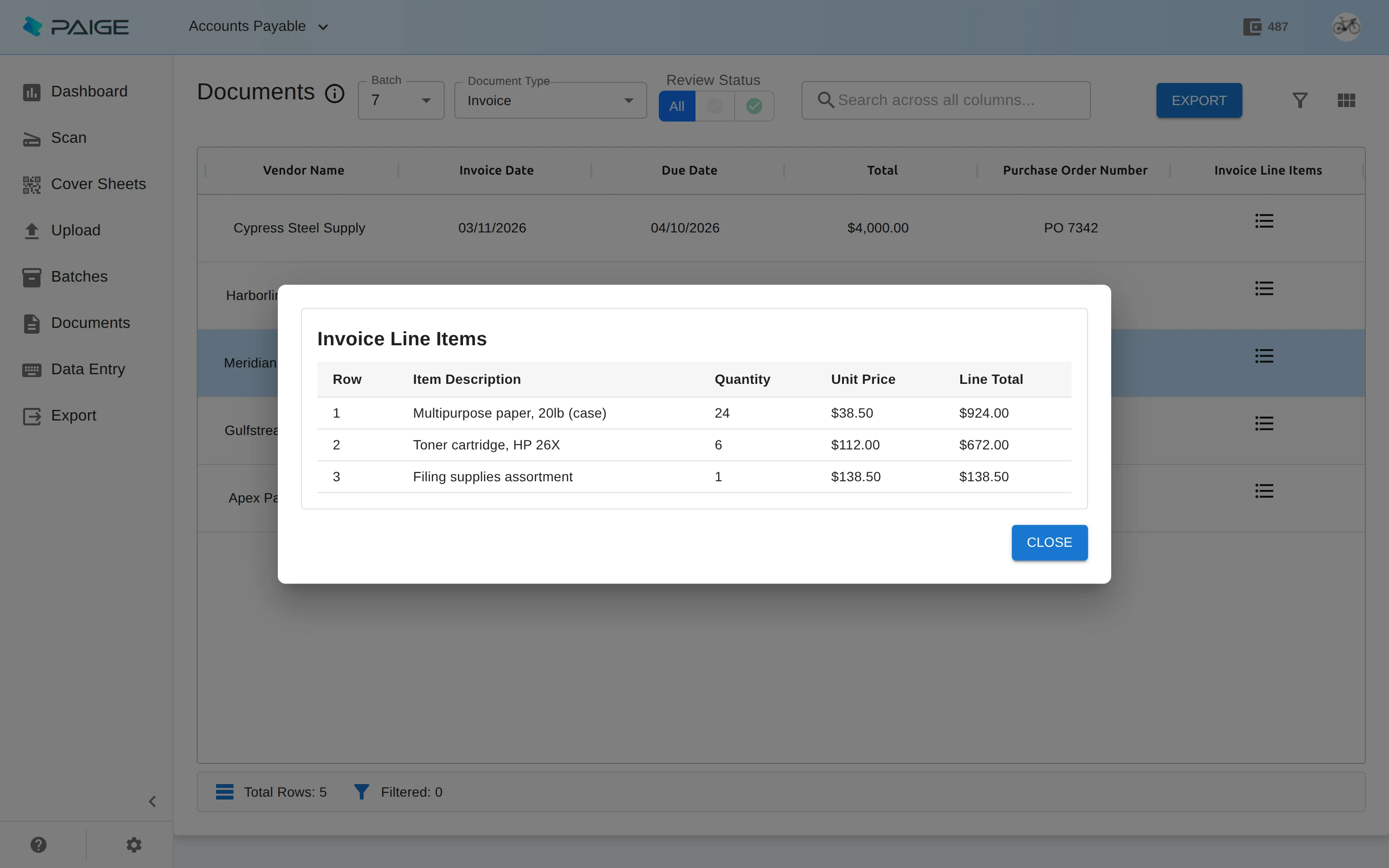
- Paige. The client sends documents in and gets clean fields and line items back, by download, SFTP or webhook into your automation. It learns from a few samples and runs on Google Cloud.
- The client wants AI for their own apps and staff, on their own hardware
- Cortexa. A private AI server with OpenAI-compatible chat, completion and embedding endpoints and OCR for PDFs and images. Apps written for the OpenAI API switch by changing the address they call and the key they use.
- The process needs approvals, forms, e-signatures or a client portal
- Nucleus One. Cloud documents and workflows with forms, e-signatures and client portals, plus Zapier and a REST API to connect the rest of the stack.
- The client needs governed records on their own servers
- Content Central. Document management with workflows, retention, legal holds and an audit trail, a REST API, and integrations with QuickBooks, Sage 50 and X3, Workday, Epicor and Dynamics CRM.
A worked example
Accounts payable automation in three pieces.
Reading. Invoices go into Paige, which returns the vendor, invoice number, dates, totals and every line item. If the client will not use the cloud, CapturePoint 6 does the same reading on a PC in their office and flags any invoice whose lines do not add up.
Hand-off. Paige delivers each result to your webhook, or CapturePoint 6 exports each document with a data file of every captured value. Either way, structured data reaches the automation you build.
Your part. Match to purchase orders, route exceptions to the right approver, post the bill to the accounting system and report on it. That is the work the client hires you for.
Discovery checklist
Six questions to ask before you scope a document AI project.
- What documents, how many a month, and how do they arrive: paper, email attachments, uploads, another system?
- Which fields and line items matter, and what does the client do with them next?
- What checks does a person do today: totals, matching to a purchase order, a vendor list?
- Where must the documents and data end up, and who signs off on exceptions?
- Can documents be processed in the cloud, or must they stay on the client’s PCs or servers?
- Who will own the process after you hand it over, and how will they handle what the tool flags?
How it fits your business
Spend your hours where clients value them.
- 01
You design the process; the product does the reading
Your billable value is in mapping the workflow, the integrations, the exceptions and the change for the client’s team. The document reading comes ready to use. - 02
Proofs of concept in a meeting
CapturePoint 6 sets up a job from a folder of sample documents, and Paige learns from a few samples. Show the client their own paperwork being read before you write the proposal. - 03
Something that keeps working after handoff
Learning from corrections means accuracy improves with use, and the review screen gives client staff a clear place to handle exceptions without calling you. - 04
Software the client buys, credited to you
Clients who buy CapturePoint 6 or Paige enter your partner code at checkout. Content Central and Cortexa are quoted, and we work those deals with you.
What Ademero provides
What you get as an Ademero partner.
Your own partner code
When a customer you bring buys CapturePoint 6 or Paige, they enter your partner code at checkout. The code credits the sale to you.
A partner portal for your accounts
One place for your customers and their products, the renewals coming up in the next 90 days, leads Ademero passes to you, every open support request across your customers, billing, and installers and help.
A product that demos itself
CapturePoint 6 ships with ready-made sample jobs on fictional documents and a built-in demo scanner, so you can run a full scan-to-export demo on a Windows laptop with no scanner and no customer files.
Free live demos with our team
For a bigger opportunity, book a free live demo and our team will walk your prospect through the products and run their real paperwork through them.
Help you can hand to customers
The help library at help.ademero.com has step-by-step guides for every product, and our support team takes tickets for you or your customers by email, phone or the support center.
Straight talk on terms
Every partnership is a conversation. We go through how buying, billing and renewals work for your business on the first call, before you sign anything.
Consultant questions
Do I need to train models or write prompts?
No. CapturePoint 6 sets up a job from a folder of sample documents and learns from confirmations and corrections. Paige learns from a few samples. Your work is the process around them, not the model.
How do Paige results get into the client’s systems?
Paige delivers results by download, SFTP or webhook. With a webhook, your automation receives each document’s fields and line items and carries them into the next system.
Can our own applications use Cortexa?
Yes. Cortexa offers OpenAI-compatible chat, completion and embedding endpoints plus OCR for PDFs and images. Applications written for the OpenAI API can use Cortexa by changing the address they call and using a Cortexa API key, and everything stays on the client’s hardware.
Does CapturePoint 6 send documents to an AI service?
No. CapturePoint 6 reads and extracts documents locally on the Windows PC it is installed on. Documents only leave that PC if the job exports them to a cloud destination the client chooses.
What are the partner terms for consultants?
They depend on how you work with clients and which products you bring them. We go through them with you on the first call, before you sign anything.
Keep reading
- Partner program overview
Who partners with Ademero, what they sell and how we support them.
- For copier and MFP dealers
Turn the scan button on every device you place into a capture sale.
- For MSPs and IT providers
Document AI your clients can run on their own PCs and servers.
- Paige
Send in documents, get clean data back, down to every line item.
Build your next client project on Ademero.
Tell us about your practice, your clients and the work you do. Our partner team reads every application and calls you to talk it through.
Rather talk first? Call (863) 937-0272 or email solutions@ademero.com.